Why sprint rounds feel harder to follow
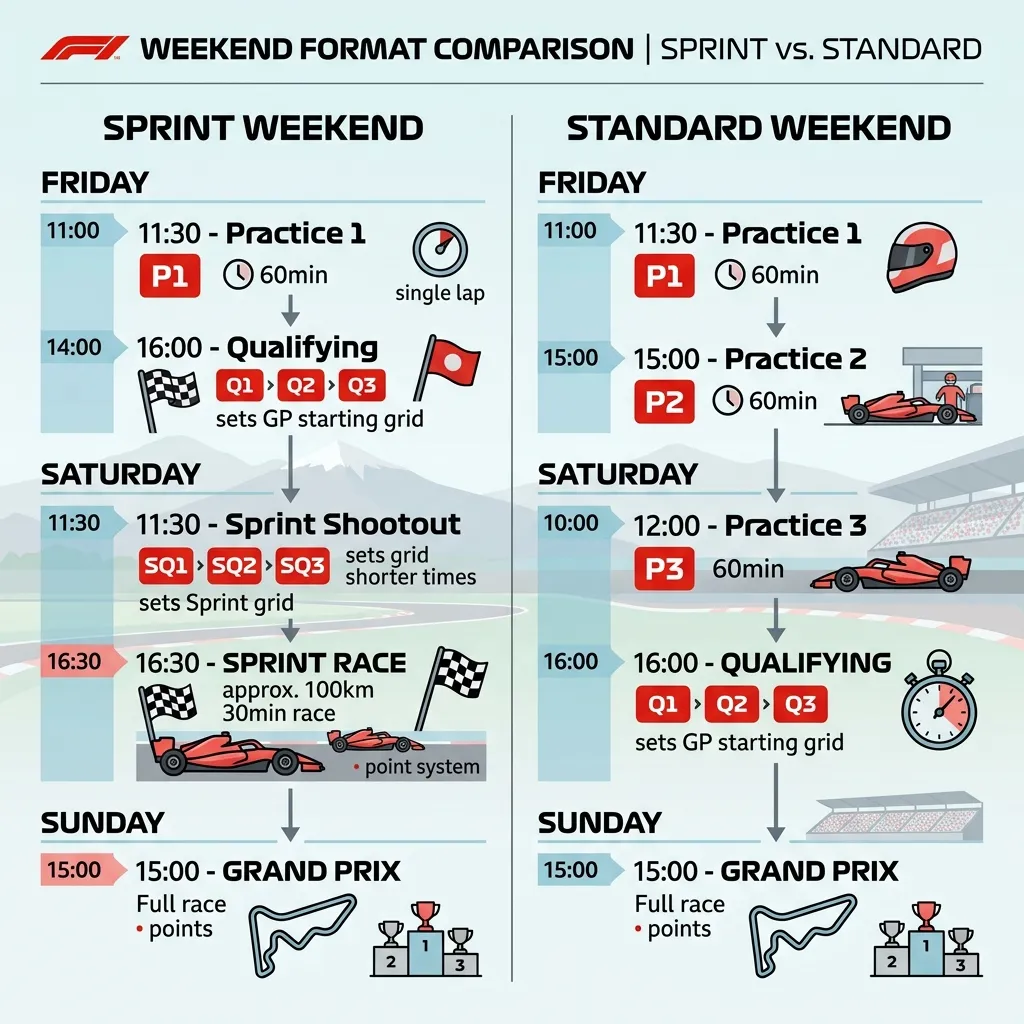
The sprint format brings meaningful sessions forward. Fans who only check timing late Saturday or Sunday often miss the session that shaped the weekend.
Search intent is straightforward: "F1 sprint weekend format", "sprint qualifying time", and "what time is sprint race". Users need reliable local timing, not abstract rule summaries.
Trademark note: F1X is unofficial and independent. All Formula 1 related marks belong to their respective owners.
Fan-first sprint timeline
- Friday: early setup context and sprint-qualifying anchor session.
- Saturday: sprint race with immediate points and momentum impact.
- Sunday: Grand Prix race with full main-event stakes.
Session labels can vary by source, but the practical takeaway stays the same: key competitive moments arrive earlier than many fans expect.
How to avoid missing sprint qualifying
Treat sprint qualifying as your weekend anchor. Once that time is confirmed in local timezone, place sprint race and Sunday race reminders around it. This single change prevents most sprint-weekend misses.
What F1x adds during sprint rounds
F1X keeps next-race countdown, full calendar view, and session context in one dashboard. Sprint rounds are also marked clearly in the calendar, helping you spot non-standard weekends quickly.
Keeping schedule, standings, and session widgets side-by-side means fewer context switches and less reminder drift.
Three sprint-weekend mistakes to avoid
1. Copying regular-weekend reminders
Sprint rounds need their own timing template. Reusing standard reminders is the fastest way to miss early sessions.
2. Tracking only one source with unclear local conversion
Always verify that your source is showing your local clock, not event-local time.
3. Ignoring standings context until Sunday
Sprint points can shift title momentum before race day. Watch points movement through the full weekend.
FAQ
Does sprint qualifying matter as much as Sunday race?
It serves a different purpose, but it can heavily shape weekend momentum and should not be treated as optional viewing.
Why are sprint weekends easier to miss in local time?
Sessions are packed tighter, so one timezone mistake can affect multiple windows.
What is the simplest sprint routine?
Lock all sprint-round sessions on Friday in your local timezone and keep one visible countdown source through Sunday.
Handle sprint weekends without confusion
Add F1X to Chrome and keep sprint schedule, countdown, and standings in one always-visible dashboard.
Get F1X Dashboard